
This article discusses minbleic subpackage - optimizer which supports boundary and linear equality/inequality constraints.
This subpackage replaces obsolete minasa subpackage.
BLEIC algorithm (boundary, linear equality-inequality constraints) can solve following optimization problems:

1 About algorithm
BLEIC as active set algorithm
Additional information
2 Starting to use algorithm
Choosing between analytic and exact gradient
Scale of the variables
Preconditioner
Stopping conditions
Constraints
3 Examples
4 Downloads section
Active set algorithm is a name for a family of methods used to solve optimization problems with equality/inequality constraints. Method name comes from the classification of constraints, which divides them into active at the current point and inactive ones. The method reduces equality/inequality constrained problem to a sequence of equality-only constrained subproblems. Active inequality constraints are treated as equality ones, inactive ones are temporarily ignored (although we continue to track them).
Informally speaking, current point travels through feasible set, "sticking" to or "unsticking" from boundaries. Image below contains example for some problem with three boundary constraints:
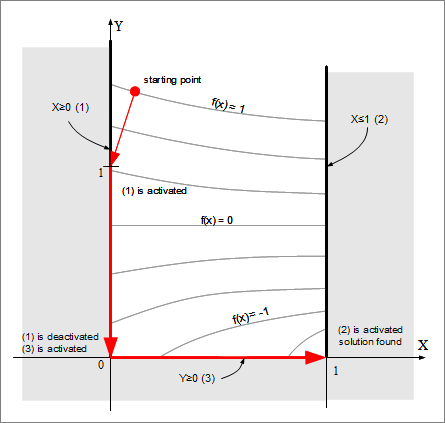
The most important feature of active set family is that active set method is easy to implement for problems with linear constraints. Equality-constrained subproblems can be easily solved by projection onto subspace spanned by active constraints. In the linear case active set method outperforms its main competitors (penalty, barrier or modified Lagrangian methods). In particular, constraints (both boundary and linear) are satisfied with much higher accuracy.
In this section we'll consider key features of the BLEIC algorithm (implemented by minbleic subpackage). Below we'll use following notation: N will denote number of variables, K will denote number of general form linear constraints (both equality and inequality ones), Ki will denote number of general form inequality constraints.
Following properties should be noted:
Before starting to use L-BFGS/CG optimizer you have to choose between numerical diffirentiation or calculation of analytical gradient. For example, if you want to minimize f(x,y)=x2+exp(x+y)+y2, then optimizer will need both function value at some intermediate point and function derivatives df/dx and df/dy. How can we calculate these derivatives? ALGLIB users have several options:
Depending on the specific option chosen by you, you will use different functions to create optimizer and start optimization. If you want to optimize with user-supplied gradient (either manually calculated or obtained through automatic differentiation), then you should:
If you want to use ALGLIB-supplied numerical differentiation, then you should:
Before you start to use optimizer, we recommend you to set scale of the variables with minbleicsetscale function. Scaling is essential for correct work of the stopping criteria (and sometimes for convergence of optimizer). You can do without scaling if your problem is well scaled. However, if some variables are up to 100 times different in magnitude, we recommend you to tell solver about their scale. And we strongly recommend to set scaling in case of larger difference in magnitudes.
We recommend you to read separate article on variable scaling, which is worth reading unless you solve some simple toy problem.
Preconditioning is a transformation which transforms optimization problem into a form more suitable to solution. Usually this transformation takes form of the linear change of the variables - multiplication by the preconditioner matrix. The most simple form of the preconditioning is a scaling of the variables (diagonal preconditioner) with carefully chosen coefficients. We recommend you to read article about preconditioning, below you can find the most important information from it.
You will need preconditioner if:
Sometimes preconditioner just accelerates convergence, but in some difficult cases it is impossible to solve problem without good preconditioning.
ALGLIB package supports several preconditioners:
Four types of inner stopping conditions can be used.
You can set one or several conditions in different combinations with minbleicsetcond function. We recommend you to use first criterion - small value of gradient norm. This criterion guarantees that algorithm will stop only near the minimum, independently if how fast/slow we converge to it. Second and third criteria are less reliable because sometimes algorithm makes small steps even when far away from minimum.
Note #1
You should not expect that algorithm will be terminated by and only by stopping criterion you've specified.
For example, algorithm may take step which will lead it exactly to the function minimum - and it will be terminated by first criterion (gradient norm is zero),
even when you told it to "make 100 iterations no matter what".
Note #2
Some stopping criteria use variable scales, which should be set by separate function call (see previous section).
BLEIC algorithm supports following kinds of constraints:
Boundary constraints can be set with minbleicsetbc function. These constraints are handled very efficiently - computational overhead for having N constraints is just O(N) additional operations per function evaluation. Finally, these constraints are always exactly satisfied. We won't calculate function at points outside of the interval given by [li,ui]. Optimization result will be inside [li,ui] or exactly at its boundary.
General linear constraints can be either equality or inequality ones. These constraints can be set with minbleicsetlc function. Linear constraints are handled less efficiently than boundary ones: they need O((N+Ki)·K) additional operations per function evaluation, where N is a number of variables, K - is a number of linear equality/inequality constraints, Ki is a number of inequality constraints. We also need O((N+Ki)·K2) in order to reorthogonalize constraint matrix every time we activate/deactivate even one constraint. Finally, unlike boundary constraints, linear ones are not satisfied exactly - small error is possible, about N·ε in magnitude. For example, when we have x+y≤1 as constraint we can stop at the point which is slightly beyond the boundary specified by x+y=1.
Both types of constraints (boundary and linear ones) can be set independently of each other. You can set boundary only, linear only, or arbitrary combination of boundary/linear constraints.
In order to help you use BLEIC algorithm we've prepared several examples:
We also recommend you to read 'Optimization tips and tricks' article, which discusses typical problems arising during optimization.
This article is licensed for personal use only.
ALGLIB Project offers you two editions of ALGLIB:
ALGLIB Free Edition:
+delivered for free
+offers full set of numerical functionality
+extensive algorithmic optimizations
-no multithreading
-non-commercial license
ALGLIB Commercial Edition:
+flexible pricing
+offers full set of numerical functionality
+extensive algorithmic optimizations
+high performance (SMP, SIMD)
+commercial license with support plan
Links to download sections for Free and Commercial editions can be found below:


